
How To Register, Login, View PNP Payslip Portal (pais.pnp.gov.ph)

PNP Payslip Login: The Philippine National Police continues to modernize its systems, making it easier for personnel to access salary records through the PNP Online Payslip Portal.

Looking for PNP payslip login 2026? Learn how to access the official portal, register your account, reset your password, and download your payslip online in the Philippines. Content updated on 23/5/2026

Related – How to register Police Clearance Online & Pay Via GCash?

Table of Contents

PNP Payslip Portal vs PNP Online PAIS: What’s the Difference?

The Philippine National Police (PNP) provides separate online systems for managing personnel information and accessing payslip records.

PNP Online Payslip Portal: Visit https://payslip.pnppms.org/Account/Login to access the payslip login service. This is the payslip address listed by the PNP Rizal Police Provincial Office.

PNP Online PAIS: Visit https://pais.pnp.gov.ph/Account/Login to access the Personnel Accounting and Information System (PAIS), which is associated with personnel information and records.

If you want to check your salary information or obtain a payslip, use the PNP Online Payslip Portal rather than the PAIS personnel login page.

For security, access these services through links published by official PNP websites and never enter your credentials on unofficial login forms.

PNP Payslip and PAIS Portal Comparison

FeaturePNP Payslip PortalPNP Online PAIS
Websitepayslip.pnppms.orgpais.pnp.gov.ph
Main purposeSalary and payslip accessPersonnel information management
InformationEarnings, deductions, net payPersonnel records
Intended usersAuthorized PNP personnelAuthorized PNP personnel

Which Portal Should You Use?

If you want to view your monthly salary, check deductions, or get a copy of your payslip, visit:

PNP Payslip: https://payslip.pnppms.org/Account/Login

For personnel information and PAIS-related services, visit:

PNP Online PAIS: https://pais.pnp.gov.ph/Account/Login

Both portals are listed on the PNP Rizal Police Provincial Office’s official information systems page. Always verify the website address before entering your account details.

❓ How to Login to PNP Payslip Portal 2026 (Quick Steps)?

To log in to the PNP payslip portal in 2026, visit the official website, enter your PNP ID and password, and click login. Once inside your dashboard, you can instantly view, download, or print your payslip online.

PNP Payslip portal login page

📌 Steps to Login:

  1. Go to https://payslip.pnppms.org
  2. Enter your PNP ID
  3. Input your password
  4. Click “Login”
  5. View or download your payslip

Are you searching for pnp payslip login, how to login pnp payslip, pnppms payslip portal steps? This content helps you alot! Thank me later.

PNP Payslip Not Showing? Common Causes and Solutions

Sometimes, PNP personnel can log in successfully but cannot find their latest payslip. The page may display an older salary record, show no available document, or fail to load the selected month.

There are several possible reasons for this.

1. Monthly Payslip Has Not Been Released

Your latest payslip may not be available if payroll processing is still underway.

What to do: Check the portal again after your unit’s expected payroll processing period. If the record remains unavailable, confirm its status with your finance office.

2. Incorrect Month Selected

If the portal provides a month or payroll period selector, the wrong selection may prevent you from finding the record you need.

What to do: Review the selected month and year before searching again.

3. Account or Payroll Record Issue

Personnel who have recently transferred, received a promotion, or joined the service may experience delays while their payroll information is being updated.

What to do: Ask your administrative or finance office to verify your payroll record.

4. Browser or Internet Problems

A slow internet connection, outdated browser, or temporary website error may prevent salary information from loading.

What to do:

  1. Refresh the page.
  2. Check your internet connection.
  3. Open the portal using another browser.
  4. Clear the browser cache if the problem continues.
  5. Log in again through the verified portal address.

5. Temporary Portal Maintenance

The PNP Payslip website may occasionally be unavailable because of maintenance or other technical problems.

What to do: Try accessing the website later. If the problem continues, report it through your unit’s authorized support channel.

What If Your Payslip Is Still Missing?

If you have checked the correct payroll period and tried the basic troubleshooting steps, contact your regional finance office.

Provide your name, unit, and the month of the missing payslip through an approved communication channel. Avoid posting account details or salary information publicly.

What is the PNP Payslip Portal Philippines and How It Works?
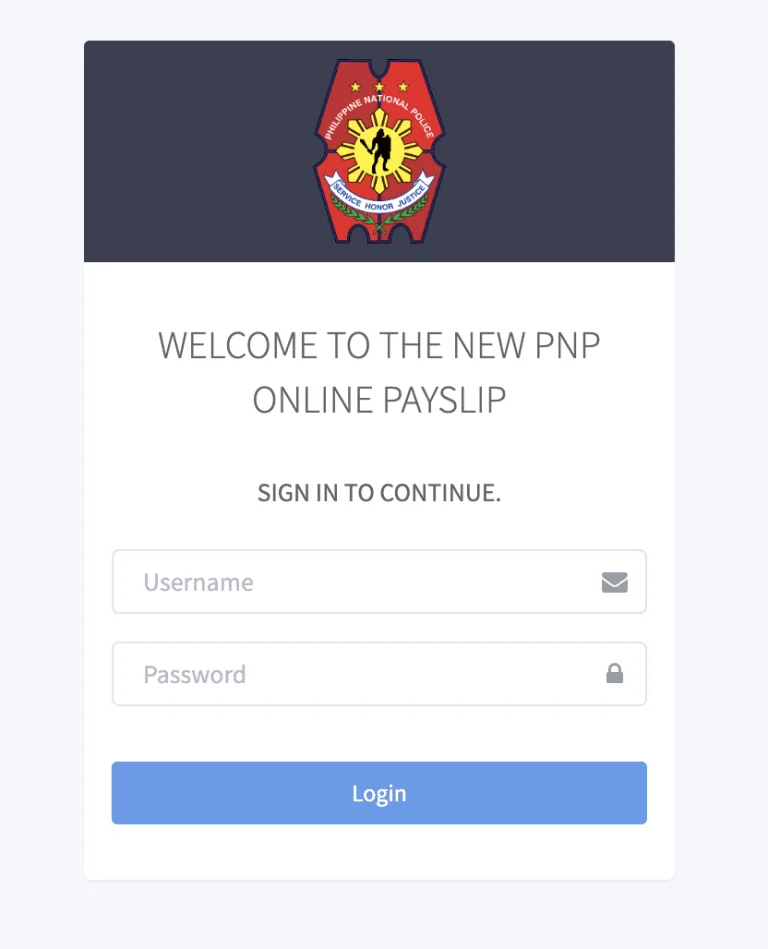
PNP Payslip Portal Philippines

The PNP Payslip Portal is an online platform where active personnel can:

  • View monthly salary records
  • Download payslips in PDF format
  • Track earnings and deductions
  • Manage account settings securely

👉 Official access is available via the portal:

payslip pnppms org login guide

This system reduces paperwork and allows 24/7 access to financial records, making it faster and more efficient than manual requests.

PNP Payslip Login 2026 Step-by-Step Guide for First-Time and Existing Users

Logging in is simple if you already have an account.

Follow these steps:

  1. Visit the official payslip portal
  2. Enter your PNP ID (username)
  3. Input your password
  4. Click Login
PNP Payslip sample showing earnings and deductions

Once logged in, you’ll be redirected to your dashboard where you can:

  • View your latest payslip
  • Download previous salary records
  • Monitor deductions and allowances

👉 Always double-check your login credentials to avoid access issues.

How to Get Previous Month’s PNP Payslip Online

Need a copy of an older PNP payslip? Personnel may need previous salary records when applying for a loan, checking past deductions, or reviewing their monthly earnings.

You can start by checking whether the PNP Online Payslip Portal provides access to earlier payroll periods.

Steps to Check Previous PNP Payslips

  1. Visit the PNP Payslip Portal at https://payslip.pnppms.org/Account/Login.
  2. Sign in using your registered account credentials.
  3. Open the available payslip or payroll records section.
  4. Look for a month, year, or payroll history option.
  5. Select the previous salary period if it is available.
  6. Open the payslip and use the available download or print option.

The available features and historical records may vary. If you cannot find the required month, contact your finance office to ask how to obtain the document.

How Many Months of PNP Payslips Can You Download?

The number of previous payslips available online depends on the records and features provided by the payroll system.

If an older payslip is unavailable, personnel can request guidance from their Regional Finance Service Office.

Can You Use a Previous Payslip for a Bank Loan?

Banks and lending institutions may ask for recent salary documents as proof of income.

However, the PNP Finance Service distinguishes between online payslips for personal reference and officially issued payslips for formal transactions. If you need a certified salary document, ask the receiving institution what it accepts and contact the appropriate PNP Finance Service office.

How to Register PNP Payslip Account Online Philippines 2026

If you’re a new user, you must register before accessing the system.
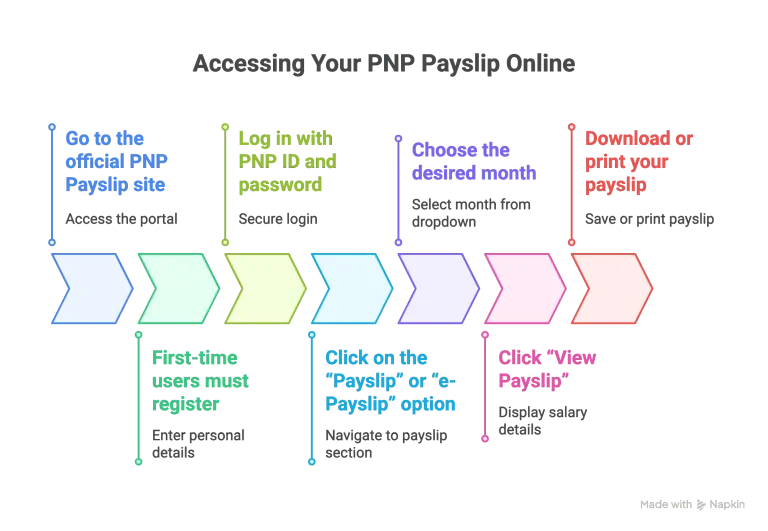
Register PNP Payslip Account Online Philippines

Registration Steps:

  1. Go to the official portal
  2. Enter your personal details:
    • Full name
    • PNP ID number
    • Email address
  3. Create a secure password
  4. Submit the registration form

Learn 👉 how to apply for police clearance online

After registration:

  • Log in using your PNP ID
  • Navigate to e-Payslip
  • Select the month you want to view

👉 You can also download or print your payslip instantly.

How to Reset PNP Payslip Password Online Philippines (Forgot Password Guide)

Forgot your password? The system provides an easy recovery option.

Password Reset Steps:

  1. Click “Forgot Password” on the login page
  2. Enter your registered PNP ID or email
  3. Check your email for the verification link
  4. Create a new password
  5. Log in again using the updated credentials

👉 Tip: Use a strong password with letters, numbers, and symbols for better security. You may also need a Barangay Clearance for Employment

How to View and Download PNP Payslip Online Step-by-Step

After logging in:

  1. Click Payslip / e-Payslip
  2. Select the desired month
  3. Click View Payslip
  4. Download or print the file

The system provides a clear breakdown of your salary details, making it easy to track your finances.

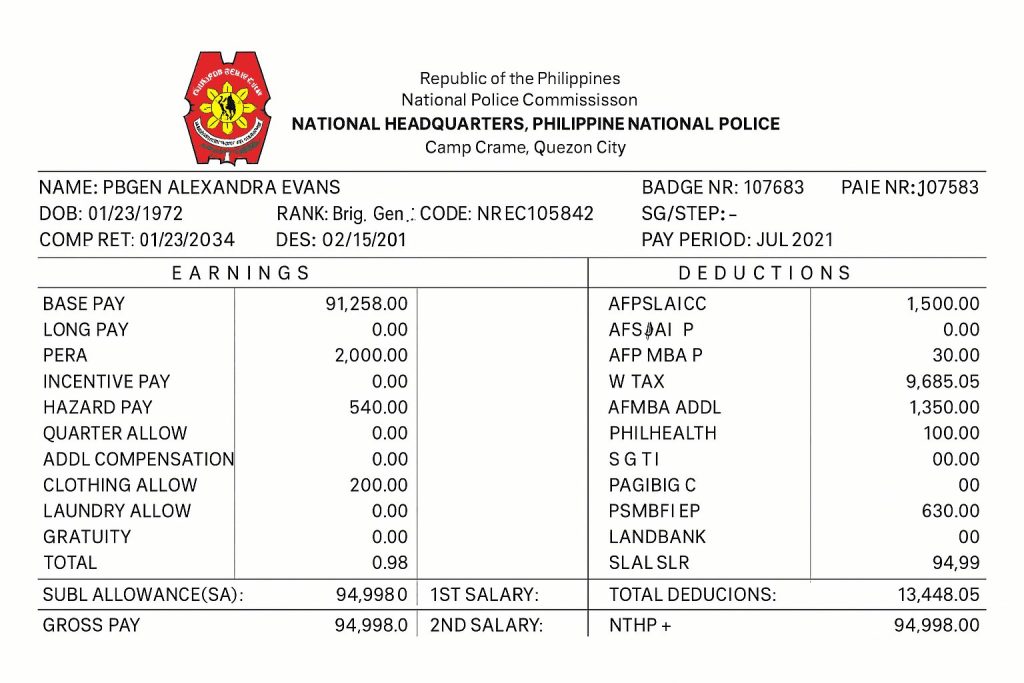
PNP Payslip Format Explained (Salary Breakdown Philippines)

Your electronic payslip is divided into key sections:

👤 Employee Information

  • Name
  • Badge number
  • Rank

💰 Earnings

  • Basic salary
  • Hazard pay
  • Allowances (rice, clothing, longevity)

➖ Deductions

  • Government Service Insurance System contributions
  • PhilHealth
  • Pag-IBIG Fund
  • Taxes and loan payments

🧾 Net Pay

  • Final take-home salary after deductions

👉 This structured format helps personnel easily monitor income and expenses.

PNP Payslip Format
How to Check PNP Payslip Deductions and Net Salary

Your PNP payslip contains more than your monthly basic salary. It also shows deductions that affect the final amount you receive.

Reviewing these figures regularly can help you identify unexpected changes and understand how your take-home pay is calculated.

Common Deductions on a PNP Payslip

Depending on your employment status and applicable payroll arrangements, deductions may include:

  • GSIS Contributions: Government Service Insurance System contributions applicable to covered personnel.
  • PhilHealth Contributions: Payments toward national health insurance coverage.
  • Pag-IBIG Contributions: Contributions to the Pag-IBIG Fund.
  • Withholding Tax: Income tax deducted according to applicable tax rules.
  • Loan Repayments: Payments for authorized loans or salary deductions.
  • Other Authorized Deductions: Additional amounts processed under applicable payroll arrangements.

Not every deduction applies to every PNP employee. The actual amounts depend on individual circumstances and current regulations.

How Is PNP Net Pay Calculated?

Net pay is the amount remaining after deductions are subtracted from total earnings.

For example:

Salary DetailsExample Amount
Basic Salary₱32,000
Allowances₱5,000
Gross Earnings₱37,000
Total Deductions₱7,500
Net Pay₱29,500

This is only an illustrative calculation, not an official PNP salary rate or deduction schedule.

What If Your PNP Payslip Shows an Incorrect Deduction?

Compare the amount with your previous payslip and check whether there have been changes to your contributions, taxes, or loan payments.

If a deduction appears incorrect, contact your unit’s finance office and request clarification.

Keep a copy of the relevant payslip and any supporting documents so the finance personnel can review the transaction.

PNP Payslip Portal vs Manual Payslip Request Philippines

FeatureOnline PortalManual Request
Access24/7Office hours
SpeedInstantDays
ConvenienceHighLow

Troubleshooting PNP Payslip Login Issues and Access Errors

If you can’t access your account, try these fixes:

  • Clear browser cache or use incognito mode
  • Ensure correct PNP ID and password
  • Avoid VPNs or restricted networks
  • Try a different browser or device

If the issue persists, contact:

PNP Payslip Login Errors and How to Fix Them

Having trouble opening your PNP Online Payslip account? Login problems can occur because of incorrect credentials, browser settings, internet connectivity, or temporary website issues.

Here are some common errors you may encounter and the steps worth trying.

Login ProblemPossible ReasonRecommended Solution
Invalid username or passwordIncorrect account detailsRecheck your credentials
Account not recognizedAccount or payroll record issueContact your finance office
Page not loadingInternet or server problemCheck the connection and retry
Session expiredLogin session endedReturn to the login page
Access deniedAccount permission or access restrictionContact authorized support
Download not workingBrowser or file handling problemTry another browser

The wording of these messages may differ depending on the portal’s current interface.

What to Do When Your PNP Payslip Password Is Not Working

First, make sure you are using the correct username and password. Check for typing errors, unwanted spaces, and incorrect capitalization.

If you still cannot log in, follow the password recovery procedure provided by the PNP Finance Service.

The Finance Service’s 2025 Citizen’s Charter includes a procedure for resetting online payslip passwords through its Financial Information Management Division. Personnel are required to provide identification and complete the prescribed request process.

What If the PNP Payslip Website Is Down?

If the login page does not open, check whether other websites work normally on your device.

You can also try another browser or internet connection. When multiple attempts fail, the problem may be related to portal availability rather than your account.

Avoid repeatedly entering your password on unfamiliar websites claiming to provide alternative PNP payslip access.

PNP Payslip Help and Official Support for Login and Salary Issues

If you cannot access your PNP payslip or notice an error in your salary records, the appropriate PNP administrative or finance office can help you determine what needs to be corrected.

The PNP Finance Service handles payroll-related processes, including certain requests involving payslip issuance and password resets.

Where to Get Help With Your PNP Payslip

1. Your Unit’s Administrative Office

Contact your administrative office if you are a newly appointed employee, recently transferred to another unit, or unsure whether your personnel records are updated.

2. Regional Finance Service Office

For missing payslips, salary discrepancies, and payroll-related questions, contact the appropriate Regional Finance Service Office.

3. PNP Finance Service

For matters involving officially issued payslips and account recovery, consult the PNP Finance Service and its published service procedures.

Official Finance Service website: https://fs.pnp.gov.ph/

Information to Prepare Before Contacting Support

To help staff identify your concern, prepare the following details:

  • Full name and assigned unit
  • Relevant payroll month and year
  • Brief description of the problem
  • Screenshot of the error, with sensitive details hidden
  • Valid identification, when required through an official process

Do not send passwords, one-time verification codes, or complete salary records through public comments or unverified messaging accounts.

How to Request a PNP Payslip Password Reset

The PNP Finance Service’s published 2025 procedure identifies the Financial Information Management Division as the office handling online payslip password reset requests.

Under that procedure, personnel present valid identification and complete the designated request form. The office verifies the personnel record before issuing a temporary password.

Check the latest Finance Service instructions before visiting, as requirements and processing arrangements may change.

Important Reminder

This website provides independent information about the PNP Payslip Portal. It is not operated by or officially affiliated with the Philippine National Police.

For account access, payroll corrections, and official documents, follow instructions issued directly by the PNP or your authorized finance office.

Tips for Secure PNP Payslip Portal Login and Account Protection

Protect your account with these best practices:

  • Always log out after use
  • Avoid public Wi-Fi when accessing the portal
  • Change your password regularly
  • Never share your login credentials
  • Enable extra security features if available

👉 The Philippine National Police also advises users to report suspicious activity immediately.

You can Check police clearance verification guide here

Can You Access PNP Payslip on Mobile in 2026?

Yes, the portal is mobile-friendly and can be accessed via smartphone browsers.

However:

  • There is no official mobile app yet
  • Use secure internet connections when logging in

Frequently Asked Questions About PNP Payslip Login Philippines

How often are payslips updated?

Payslips are updated monthly, depending on payroll processing.

What if my payslip has incorrect details?

Report it immediately to your regional finance office for correction.

Can retired personnel access the portal?

Access may be limited; check with your assigned finance unit.

What is the official PNP Payslip login website?

The PNP Rizal Police Provincial Office lists https://payslip.pnppms.org/Account/Login as its PNP Online Payslip link.

Is PNP Online PAIS the same as PNP Payslip?

No. Official PNP resources list separate links for PNP Online PAIS and PNP Online Payslip.

Why can’t I log in to my PNP Payslip account?

Possible causes include incorrect credentials, browser problems or service interruptions. Check the URL and credentials first, then contact your authorized PNP support unit if necessary.

How do I get my previous month’s PNP Payslip?

Check the payslip portal for an available month or history selector. If the required record is unavailable, ask your unit’s payroll or finance office.

What should I do if my PNP Payslip is missing?

Confirm that the relevant payroll period has been processed and ask your authorized payroll or finance office whether the record is available.

Can I use my PNP Payslip as proof of income?

A payslip may support income verification, but acceptance depends on the requesting bank, lender, employer or agency.

Final Thoughts – PNP Payslip Portal Login

The PNP Payslip Login Portal 2026 is a powerful digital tool that gives personnel full control over their salary information. From easy login and registration to password recovery and payslip downloads, everything is now streamlined online.

By using the system properly and securely, members of the Philippine National Police can:

  • Track earnings in real time
  • Reduce paperwork
  • Access financial data anytime, anywhere

Need help accessing your PNP payslip? Comment below or check our complete guides on police clearance and verification.

Get Information about PNP Payslip / https://pnppayslips.com/

5/5 - (2 votes)

Leave a Comment