
Applying for a police clearance in the Philippines has become much easier thanks to the National Police Clearance System. With online registration and digital payments like GCash, you can complete most of the process from home.
This guide walks you through how to register police clearance online and pay via GCash, including practical tips and long-tail insights to help you avoid errors.
What Is a Police Clearance?
A police clearance is an official document issued by the Philippine National Police confirming that an individual has no criminal record. It is commonly required for:
- Local employment and job hiring
- Overseas job applications
- Government and legal transactions
- Business permits and ID applications
Step 1: how to register police clearance online Philippines step by step
To begin your application, use the official portal:
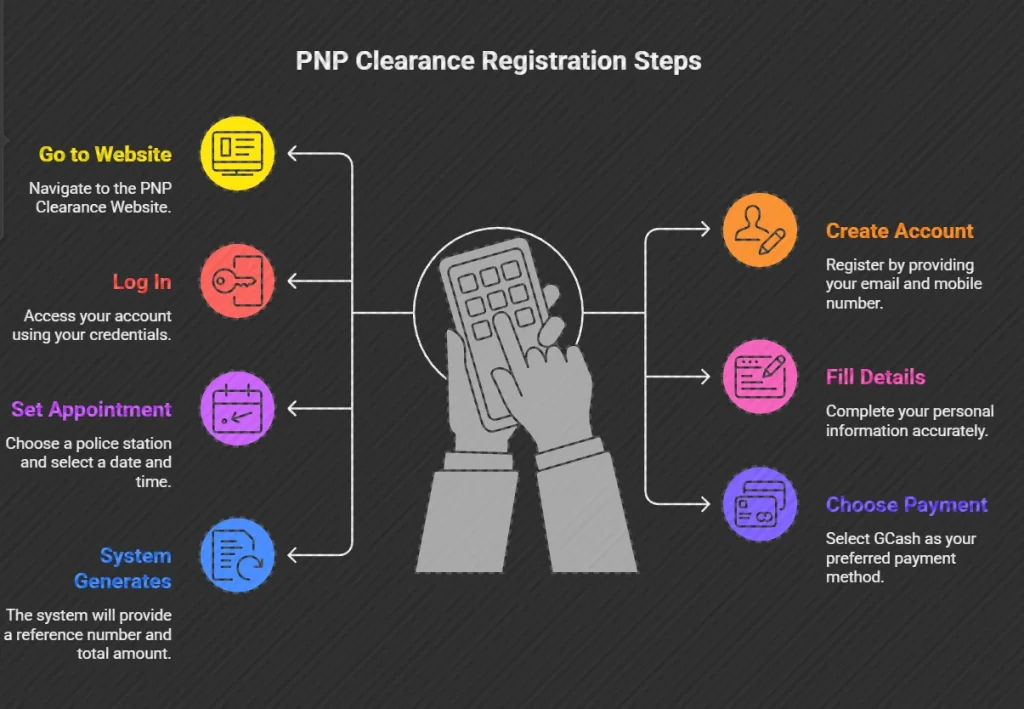
Online Registration Process
- Go to the official PNP clearance website
- Create an account using your email and mobile number
- Log in and fill out your personal details
- Schedule an appointment at your preferred police station
- Select your payment method (choose GCash)
Once completed, the system will generate:
- Reference Number
- Total Payment Amount
Step 2: how to pay police clearance using GCash Dragonpay Philippines
Using GCash is one of the fastest and most convenient payment options.
Method 1: Pay Bills via GCash App
- Open your GCash app and log in
- Tap “Bills”
- Select Government
- Choose PNP – Police Clearance
- Enter:
- Reference Number
- Payment Amount (₱150 + fees)
- Email Address
- Tap Confirm and wait for receipt
Method 2: Pay via Dragonpay or Landbank Gateway
If redirected from the PNP portal:
- Choose GCash as payment option
- Enter your mobile number
- Confirm payment via OTP or GCash app
Police Clearance Fees (GCash Payment)
| Fee Type | Amount |
|---|---|
| Police Clearance | ₱150 |
| E-payment Fee | ₱10–₱20 |
| Total تكلفة | ₱160–₱170 |
💡 Always verify the exact amount shown on your reference slip.
What to bring for police clearance appointment Philippines 2026
Once payment is successful:
- Return to the PNP clearance portal
- Check if status is marked “PAID”
- Print your application form and receipt
- Attend your appointment with:
- At least two valid IDs
- Printed documents
GCash police clearance payment not reflecting Philippines fix
If your payment doesn’t reflect:
- Check GCash transaction history
- Save or screenshot your receipt
- Contact PNP support or GCash Help Center
Tips for a Smooth Online Police Clearance Application
- Ensure sufficient GCash balance
- Use stable internet connection
- Double-check reference number before payment
- Avoid refreshing payment pages
- Save all receipts and confirmations
Benefits of using GCash for police clearance payment Philippines
- Fast and real-time processing
- No need to visit banks or payment centers
- Secure and trackable transactions
- Convenient mobile access anytime
Frequently Asked Questions:
Can I pay police clearance for someone else using GCash?
Yes, as long as the correct reference number and details are used.
Is GCash the only payment method?
No, other options include banks, payment centers, and e-wallets.
How long does payment verification take?
Usually real-time, but may take a few minutes depending on the system.
Final Thoughts
Registering for a police clearance online and paying via GCash is now the fastest and most efficient method in the Philippines. By following the correct steps and using secure payment channels, you can complete your application smoothly—without long lines or delays.